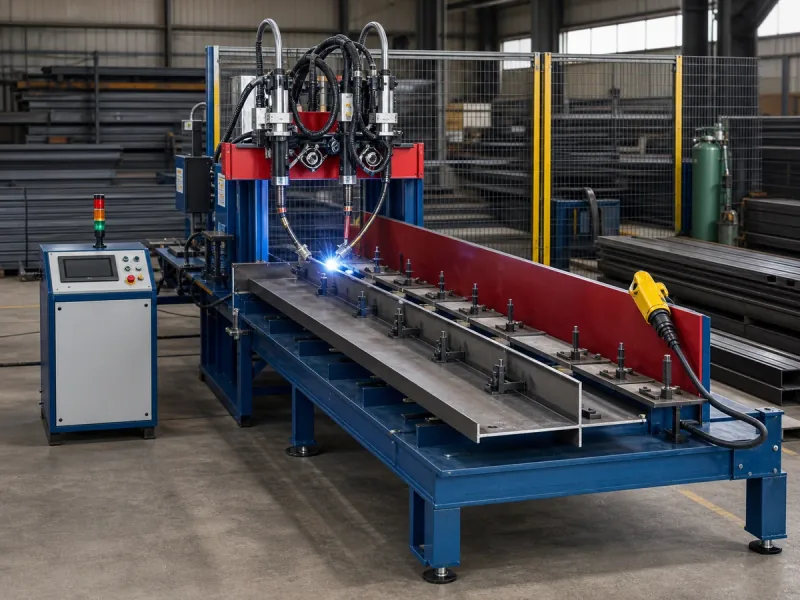
What do I need before requesting a cleat welding fixture?
Provide the actual assembly drawing, individual component drawings, material and thickness information, weld locations, and representative sample parts. Identify the drawing revisions and the finished assembly's required orientation. A photograph or a plate's outer dimensions alone does not define the fixture or welding programme.
Our W01 purlin cleat plate welding machine is described in the supplied presentation as a dedicated locating, clamping and twin-gun cell. This guide helps prepare a configuration enquiry; it is not a fixture design, structural connection design or operating instruction.
Four views to prepare your drawing pack
Conceptual input sketches only—not to scale, an actual assembly, fixture design, clamp position, torch path or welding instruction. Use your approved drawings for all project values.
Match each component ID and revision to the finished assembly. Identify which drawing and production variant each sample represents.
Mark the reference surfaces you want reviewed and areas that must remain clear. This sketch does not choose a datum or an approved clamp location.
Identify the required joint locations and approved weld-drawing reference. Required symbols, lengths and sizes must come from that drawing—not this sketch.
State who supplies, loads and removes parts, and which functions you request inside the cell. Automatic feeding or conveyors are not assumed included.
Which drawing information should I include?
| Document | Information to supply | Why it belongs in the enquiry |
|---|---|---|
| Assembly drawing | Finished arrangement; part references; drawing revision; required orientation. | Shows what the assembled part is meant to be. |
| Component drawings | Actual materials and thicknesses; dimensions; holes; relevant datum references and drawing tolerances. | Defines the components presented to the fixture. |
| Weld drawing | Joint locations; specified weld symbols; lengths and sizes from the approved design; document reference. | Identifies the required welds without asking the machine supplier to guess them. |
| Sample identification | Which drawing revision each sample represents; known differences from production parts. | Separates an illustrative sample from the intended production configuration. |
Use the values and symbols already specified by the responsible designer. Do not select a weld size, fit-up tolerance or clamp force from a general website checklist.
What needs discussion beyond the plate dimensions?
Locating and access
Show the intended reference surfaces and any areas that must remain free of clamp contact. Include photographs from more than one direction and explain the loading orientation. Ask the supplier to review access to every required weld and to confirm what fixture changes are needed between part variants.
Product family and changeover
List variants separately: what changes in the components, weld arrangement, orientation or handling? Ask whether one fixture, interchangeable locating elements or separate fixtures are proposed. A common machine body does not establish that every variant uses the same tooling.
Loading and unloading scope
State which operations are manual and which are requested as automation. Define the handover of parts to the fixture and of completed assemblies to the next process. Do not assume that conveyors or automatic component feeding are included.
Keep the preparation references together
Use this reference list alongside the existing drawing-information table. It records what to send or leave open; it does not approve a fixture, procedure or part.
| Input | Reference to prepare | If unresolved |
|---|---|---|
| Assembly & components | Drawing IDs, revisions and component-to-assembly relationship. | Mark the request preliminary; list missing drawings. |
| References & contact exclusions | Marked reference surfaces, restricted areas and loading orientation. | Identify questions for the supplier's fixture review. |
| Weld locations | Approved weld-drawing ID and relevant joint references. | Ask the responsible designer; do not invent weld values. |
| Variants & samples | Variant list, sample IDs, drawing revisions and known differences. | List unrepresented variants separately. |
| Loading & unloading | Incoming condition, requested cell scope and handover owners. | Label included, optional and excluded scope as TBD. |
| Procedure & evidence | Applicable document references and responsible reviewers. | Use the evidence preparation guide; no automatic pass result. |
Open welding evidence preparation for document and reviewer questions.
Is a machine specification the same as a welding procedure?
No. The machine specification describes equipment; a welding procedure specification (WPS) describes welding variables for its intended application. TWI explains this document distinction. This is terminology guidance, not a determination of the standards or qualification route applicable to your project.
Provide the relevant procedure reference, where applicable, and identify who is responsible for reviewing its suitability. A power-source rating is not a recommended operating current, and the presentation's linear welding-speed figure is not a complete parts-per-hour guarantee.
Download the project input sheet
The editable sheet covers drawings, product variants, incoming part condition, requested process scope and unresolved items. Fill it with actual project information and use “TBD” where a value is unknown. The web inquiry form does not accept file attachments; send authorised drawings to tony.buy@gmail.com after your initial enquiry.
Common fixture preparation questions
Can I request a quote with photographs only?
Photographs can start the conversation, but mark the request as preliminary. Final fixture configuration needs the agreed component and assembly information.
Does twin-gun welding automatically double finished output?
No fixed output multiplier is established here. A representative cycle also includes loading, locating, clamping, any required movements and unloading. Agree the timing boundaries and part mix before comparing output.
Where should trial documents be agreed?
Use the welding evidence preparation guide to identify the documents and responsible reviewers before the proposed trial. It does not supply pass limits.
Discuss the actual assembly and process scope
Review the matching machine specification, then send your workpiece drawings and the preparation information. Use a preliminary enquiry for unresolved items; the final configuration is agreed against the actual project.
Discuss configurationUpdated · Prepared by Color Steel Machine. Product scope basis: the supplied steel-structure welding automation presentation; terminology references are linked where used. Document and purchasing preparation only—not a welding procedure, fixture design, inspection method, acceptance standard or safety manual. Project-specific requirements and responsible reviewers must be identified separately.